
티스토리 뷰
채팅에 핵심이라 볼 수 있는 실시간 채팅을 구현해 보겠습니다.
지난번에 게시판을 만들면서 웹소켓으로 채팅을 만들어본적이 있습니다.
https://wans1027.tistory.com/19
[Spring] 게시판 API (10) 웹소켓을 이용한 오픈채팅
이번에는 어떤기능을 게시판에 넣어볼까 하다가 게시판과는 크게 상관없지만 구현해보고 싶었던 기능인 채팅기능을 한번 해볼까 합니다. 채팅을 구현하기에 앞서 웹소켓에 대해 간단히 짚고
wans1027.tistory.com
지난번에는 웹소켓을 사용했다면 이번에는 STOMP를 이용해 좀 더 간단하게 채팅을 구현해 보겠습니다.
STOMP
STOMP란 WebSocket 위에서 동작하는 간단한 텍스트기반 메시지 프로토콜로, 클라이언트와 서버가 전송할 메시지의 유형, 형식, 내용들을 정의합니다.
WebSocket의 특징인 연결지향적, 실시간성, 양방향 통신의 특징을 모두 지니고 있습니다.
메시지 브로커를 활용하여 pub-sub(발행-구독) 방식으로 클라이언트와 서버가 쉽게 메시지를 주고받을 수 있도록하는 프로토콜로 볼 수 있습니다.
pub-sub(발행-구독)
pub-sub은 일종의 메시지 패러다임으로, 발신자가 어떤 범주, 예를들어 어떤 특정 경로와 같은 범주로 메시지를 발행하면 이 범주를 구독하고 있는 그 메시지를 받아볼 수 있는 방식으로 이해하면됩니다.
메시지브로커
메시지브로커는 발신자의 메시지를 받아와서 수신자들에게 메시지를 전달하는 어떤 것입니다.
STOMP 는 WebSocket Session처리를 따로 관리할 필요가 없습니다.
STOMP Config 설정
@Configuration
@EnableWebSocketMessageBroker
@RequiredArgsConstructor
public class StompConfig implements WebSocketMessageBrokerConfigurer {

    private final StompHandler stompHandler;
    @Override
    public void registerStompEndpoints(StompEndpointRegistry registry) {
        registry.addEndpoint("/ws/chat").setAllowedOriginPatterns("*");
        // .withSockJS();
    }

    @Override
    public void configureMessageBroker(MessageBrokerRegistry registry) {
        registry.enableSimpleBroker("/queue", "/topic");
        registry.setApplicationDestinationPrefixes("/app");
    }

    @Override
    public void configureClientInboundChannel(ChannelRegistration registration) {
        registration.interceptors(stompHandler);
    }
}
URL은 웹소켓과 마찬가지로 http가 아닌 ws 가 사용됩니다.
setAllowedOriginPatterns("*")
CORS설정을 모두 허용
withSockJS();를 통해 웹소켓을 지원하지 않는 브라우저는 sockJS를 사용하도록 합니다.
다만 테스트시 오류로 인해 잠시 주석처리 해두겠습니다.
configureMessageBroker
메시지 브로커 설정을 위한 메서드
registry.enableSimpleBroker("/queue", "/topic");
enableSimpleBroker 는 스프링에서 제공하는 내장 브로커를 사용한다는 설정입니다.
관습적으로 queue라는 prefix 는 메시지가 1:1로 송신될 때, 그리고 topic 이라는 prefix는 메시지가 1:N 여러명에게 송신될 때 주로 사용한다고 합니다.
registry.setApplicationDestinationPrefixes("/app");
메시지는 상황에 따라 필요한 경우 바로 브로커로 가는 것이 아니라, 메시지의 어떤 처리나 가공이 필요할 때 핸들러를 타게 할 수 있습니다.
메시지앞에 "/app" 이 붙어있는 경로로 발신되면 해당 경로를 처리하고 있는 핸들러로 전달되는 것입니다.
MessageController 생성
@RestController
@Slf4j
@RequiredArgsConstructor
public class MessageController {

    private final MessageService messageService;
    private final SimpMessageSendingOperations sendingOperations;

    @MessageMapping("/message")
    public void enter(SendMessage message) {
        if (Message.MessageType.ENTER.equals(message.getType())) {
            message.setDetailMessage(message.getSenderId()+"님이 입장하였습니다.");
            messageService.sendMessage(Message.MessageType.ENTER,message.roomId, message.detailMessage, message.senderId);
        }
        else messageService.sendMessage(Message.MessageType.TALK,message.roomId, message.detailMessage, message.senderId);
        log.info("roomID = {}", message.getRoomId());
        sendingOperations.convertAndSend("/topic/chat/room/"+message.getRoomId(),message);
    }


    @Data
    private static class SendMessage{
        Message.MessageType type;
        Long roomId;
        String detailMessage;
        Long senderId;
    }
}
@MessageMapping 어노테이션은 기존에 저희가 알고있던 @RequestMapping 과 비슷한 역할을 한다고 보면됩니다.
HTTP 요청이 들어왔을 때 그 요청에 맞는 핸들러에게 처리를 위임하듯이, STOMP 웹소켓 통신을 통해 메시지가 들어왔을 때도 메시지의 destination 헤더와 MessageMapping 에 설정된 경로가 일치하는 핸들러를 찾고, 그 핸들러가 처리하게 됩니다.
경로를 /message라고 설정해 두었지만 setApplicationDestinationPrefixes()를 통해 prefix를 "/app"으로 설정 해주었기 때문에, 경로가 한번 더 수정되어 “/app/message”로 바뀌게 됩니다.
Type 이 "ENTER"라면 메시지 내용을 바꿔 전달합니다.
convertAndSend
Config에서 설정해둔 "topic"에 의해 Message Broker가 해당 send를 캐치하고 해당 토픽을 구독하는 모든 사람에게 메세지를 보내게 됩니다.
이제 request된 message를 가지고 Service 처리하면 됩니다.
TEST
STOMP 테스트 툴인 APIC을 이용해 테스트 해보겠습니다.
PUB(송신)

SUB(수신)
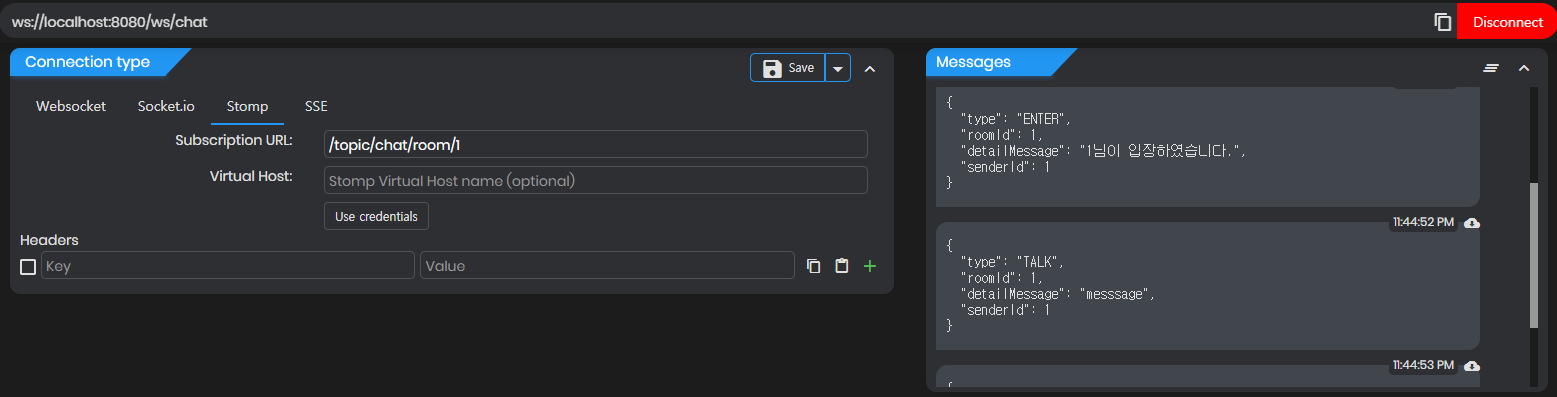
성공입니다!
STOMP에 대한 간단한 이론과 적용을 해보았습니다.
이제 Service에 전송되는 메시지를 DB에 저장하는 로직을 생각해보고 적용, 성능 최적화를 해보겠습니다.
STOMP에는 외부 브로커를 사용해 가용성을 늘릴 수 있습니다.
Kafka
[MSA] Spring + STOMP + Kafka + Kubernetes + MongoDB 고가용성 이벤트 기반 그룹채팅 아키텍처
이번에는 MSA(Micro-Service Architecture)를 구성하는데 있어 하나의 서비스에 해당하는 채팅기능을 개발해봅니다. 가용성을 위해 서버를 여러대로 확장하는 Scale-Out 을 하고 다양한 기술들을 활용해 볼
wans1027.tistory.com
RabbitMQ
2023.07.29 - [Spring/채팅앱] - [Spring 채팅앱 성능 개선기 6] 외부 MessageBroker (RabbitMQ) 적용
[Spring 채팅앱 성능 개선기 6] 외부 MessageBroker (RabbitMQ) 적용
이전 포스트 2023.07.25 - [Spring/채팅앱] - [Spring 채팅앱 성능 개선기 5] Spring Cloud LoadBalancing 적용 [Spring 채팅앱 성능 개선기 5] Spring Cloud LoadBalancing 적용 이전게시글 2023.07.13 - [Spring/채팅앱] - [Spring 채
wans1027.tistory.com
Reference
'Spring > 채팅앱' 카테고리의 다른 글
| [Spring 채팅앱 성능 개선기 4] Redis Cache 적용 (0) | 2023.07.13 |
|---|---|
| [Spring 채팅앱 성능 개선기 3] Cache 설계 전략 (0) | 2023.07.06 |
| [Spring 채팅앱 성능개선기 2] Cache를 이용한 속도향상 (0) | 2023.07.04 |
| [Spring 채팅앱 성능개선기 1] JPA 쓰기지연을 활용한 채팅내역 저장 (0) | 2023.07.03 |
| 채팅 ERD 설계 (0) | 2023.06.30 |
- Total
- Today
- Yesterday
- springboot
- 게시판 채팅
- Spring
- Flutter
- nativeQuery
- 푸시알림동작원리
- Spring 채팅
- Vmmem
- spring orphan
- Cache
- loadbalancing
- ChattingApp
- Security
- 로컬캐시
- 웹소켓 채팅
- Stomp RabbitMQ
- MessageBroker
- Vmmem종료
- Authentication
- authorization
- Spring WebSocket
- Spring 대댓글
- Kubernetes
- Spring RabbitMQ
- FCM
- Bcypt
- bcrypt
- ERD설계
- Spring Stomp
- Stomp Kafka
| 일 | 월 | 화 | 수 | 목 | 금 | 토 |
|---|---|---|---|---|---|---|
| 1 | 2 | 3 | 4 | |||
| 5 | 6 | 7 | 8 | 9 | 10 | 11 |
| 12 | 13 | 14 | 15 | 16 | 17 | 18 |
| 19 | 20 | 21 | 22 | 23 | 24 | 25 |
| 26 | 27 | 28 | 29 | 30 |